.png)
System Architecture
Understanding the modular architecture of VisionLog - Object Detection
The VisionLog - Object Detection module is built on a modular architecture designed for efficient object detection and classification. The system uses YOLO (You Only Look Once) with Ultralytics for real-time detection and embedding-based matching.
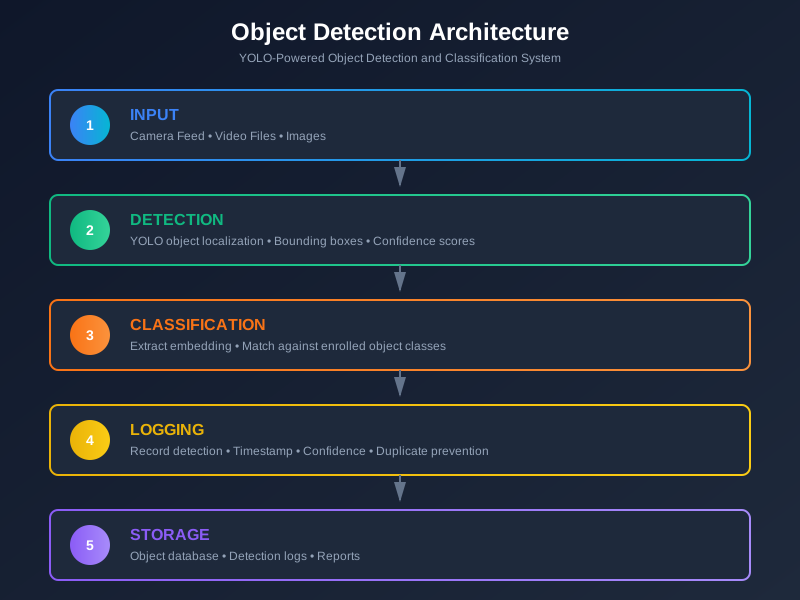
Core Components
Detection Engine
The heart of the system - handles all object detection and classification operations.
Key Functions:
| Function | Description |
|---|---|
| Object Detection | Detect all objects in a frame with confidence filtering |
| Feature Extraction | Extract embeddings from detected regions |
| Object Classification | Match embedding against enrolled database |
| Frame Processing | Combined detection + classification for a frame |
Enrollment System
Folder-based batch enrollment for adding object classes to the database.
| Feature | Description |
|---|---|
| Batch Processing | Enroll multiple object classes at once |
| Folder Structure | One folder per class with multiple reference images |
| Automatic Averaging | Multiple images averaged for robustness |
Recognition System
Real-time object detection from multiple input sources.
Input Modes:
- Camera feed (live detection)
- Single image file
- Video file processing
Features:
- FPS counter display
- Screenshot capture
- Database reload
- Confidence display toggle
Video Processor
Batch processing of CCTV recordings and video files.
Capabilities:
- Frame skipping for performance (configurable)
- Unknown object cropping and storage
- Annotated video output with bounding boxes
- Report generation with detection summary
- Progress tracking with ETA
Detection Logger
Real-time detection logging to PostgreSQL with duplicate prevention.
Features:
- Duplicate prevention mechanism (cooldown-based)
- PostgreSQL database storage
- Query and export detection logs
- Filter by date, class, or camera
YOLO Pipeline
1. Object Detection (YOLOv8)
YOLO uses a single-pass architecture for efficient detection. For each detected object, the system extracts:
- Bounding box coordinates
- Detection confidence score
- Class prediction (for pre-trained classes)
Quality Filters:
- Minimum confidence threshold: 0.25
- Non-max suppression IoU: 0.45
2. Feature Extraction
Each detected object region is cropped and converted to a 512-dimensional embedding vector using the backbone feature extractor.
3. Object Matching
Classification uses cosine similarity between embeddings.
Matching Process:
- Compare query embedding against all enrolled class embeddings
- Find the highest similarity score
- Accept match if score >= threshold (default: 0.6)
4. Embedding Averaging
For more robust enrollment, multiple reference images are averaged and normalized to create a single representative embedding per class.
Configuration
Centralized settings for the entire system:
| Setting | Description | Default |
|---|---|---|
| Model Name | YOLO model variant | yolov8n |
| Input Size | Detection resolution | 640x640 |
| GPU Support | Enable CUDA acceleration | Off |
| Similarity Threshold | Match acceptance threshold | 0.6 |
| Confidence Threshold | Detection minimum | 0.25 |
| NMS Threshold | Non-max suppression IoU | 0.45 |
| Frame Skip | Video processing optimization | Every 5 frames |
Storage
| Component | Purpose |
|---|---|
| PostgreSQL | Object embeddings and detection logs |
| Reference Images | Original images organized by class |
| Unknown Objects | Cropped images of unclassified detections |
| Output | Processed video files and reports |
Technology Summary
| Layer | Technology |
|---|---|
| Input Sources | Camera, Video Files, Images |
| Object Detection | YOLO (Ultralytics) |
| Feature Backbone | CSPDarknet + PANet |
| Matching | Cosine Similarity |
| Database | PostgreSQL with pgvector |