.png)
VisionLog Overview
High-performance AI modular platform for vision-based monitoring and analytics
VisionLog is a modular AI platform designed for advanced computer vision monitoring, forensic analysis, and real-time behavioral intelligence. By leveraging state-of-the-art deep learning models, VisionLog provides a flexible ecosystem for various specialized operations, including automated attendance tracking, security monitoring, and identity search.
AI Attendance Tracking
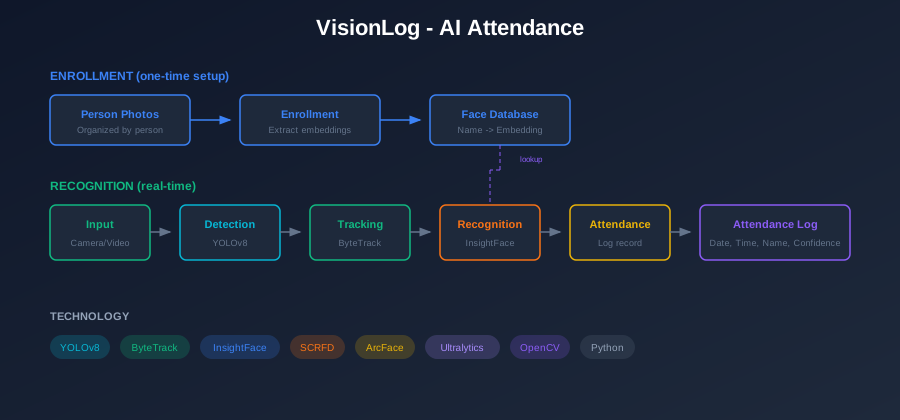
AI Attendance is a primary module within the VisionLog platform. It automates attendance logging using CCTV cameras, webcams, RTSP streams, or video files with AI-powered face recognition. The system uses a dual-stage pipeline: YOLOv8 for person detection and tracking, combined with InsightFace (buffalo_l model) for face detection and recognition.
Live Vision Operation
The Live Vision module offers real-time situational awareness by processing live streams from CCTV, IP cameras, or webcams. It displays an annotated video feed with bounding boxes, track IDs, and an identification sidebar showcasing recognized individuals alongside real-time analytics like total person count and active track count.
Person Search (Identity Search)
This forensic tool allows operators to locate specific individuals across entire video archives or live feeds. By uploading a reference photo, the system utilizes high-precision neural architectures (InsightFace ArcFace) to scan for matches, triggering real-time alerts for high-similarity detections and maintaining detailed track logs with timestamps.
Real-time Person Tracking
A unified pipeline combining person detection (YOLOv8) and robust tracking (ByteTrack) with facial recognition. The system maintains persistent "Track IDs" even when faces are temporarily obscured or turned away, using an advanced Identity Cache to ensure identity continuity across the entire tracking duration.
Key Features
- Multi-Source Input - Supports live camera streams, webcams, RTSP streams, and offline video files (MP4, AVI, MKV)
- YOLOv8 Person Tracking - Persistent track IDs across frames with ByteTrack
- InsightFace Engine - Uses SCRFD for face detection and ArcFace for recognition (buffalo_l model)
- Folder-Based Enrollment - Organize person images in folders named by person for easy batch enrollment
- Real-time Recognition - Process camera feed or video files with live face detection
- Attendance Tracking - Automatic logging with identity caching and duplicate prevention
- Zero-Lag RTSP - Multi-threaded IP camera processing with auto-reconnect
- Comprehensive Logging - CSV logs with frame, timestamp, track ID, name, and confidence
How It Works
The system follows a dual-stage processing pipeline:
| Step | Component | Technology | Description |
|---|---|---|---|
| 1 | Enrollment | InsightFace | Create face database by enrolling persons from folders |
| 2 | Video Input | OpenCV | Capture from camera, video files, or RTSP streams |
| 3 | Person Detection | YOLOv8 | Detect all people in frame with bounding boxes |
| 4 | Tracking | ByteTrack | Assign persistent track IDs across frames |
| 5 | Face Detection | InsightFace SCRFD | Detect faces in full frame |
| 6 | Face Recognition | InsightFace ArcFace | Generate 512-d embeddings, match against database |
| 7 | IoU Matching | NumPy | Link detected faces to tracked persons |
| 8 | Attendance Logging | CSV | Log recognized persons with timestamps and track IDs |
System Architecture
The architecture consists of modular components for different functions:
| Module | Purpose |
|---|---|
| Face Tracker | YOLOv8 person detection with ByteTrack |
| Face Engine | InsightFace detection & recognition |
| Enrollment | Folder-based batch face enrollment |
| Recognition | Real-time face recognition |
| Attendance | Attendance tracking with identity caching |
| Video Processor | Video/webcam/RTSP processing |
| Configuration | Centralized settings |
Technology Stack
| Component | Technology |
|---|---|
| Person Detection | YOLOv8 (Ultralytics) |
| Person Tracking | ByteTrack |
| Face Detection | InsightFace SCRFD |
| Face Recognition | InsightFace ArcFace (buffalo_l model) |
| Embedding Storage | Pickle (embeddings.pkl) |
| Image Processing | OpenCV |
| Logging | CSV format |
| GPU Support | CUDA (optional) |
Experimental Lab
Beyond the core attendance and surveillance modules, VisionLog includes an Experimental Lab — a dedicated section for advanced computer vision features under active development. These use cases explore capabilities that extend the platform into broader AI-vision domains.
Access the Experimental Lab via the Lab button in the main sidebar, or navigate directly to /experimental.
Face Draw (Randomizer)
An AI-powered participant randomizer that detects all faces in an uploaded group photo and uses them as entries in an animated draw. The system analyzes the image via the recognition engine, extracts individual face crops, and lets operators run a fair random selection using one of five animated draw methods.
| Draw Method | Description |
|---|---|
| Spin Wheel | Classic spinning wheel with each face as a segment |
| Spotlight | Sweeping spotlight that slows to land on the winner |
| Bubble Pop | Face bubbles eliminated one-by-one |
| Black Hole | Vortex pulls participants in until one remains |
| Cyber Lock | Futuristic targeting lock-on mechanism |
External participants (not in the photo) can also be added manually.
Cross-Camera Tracker
Tracks a target individual across multiple simultaneous camera feeds using biometric identity matching. A reference image is used to scan live or recorded footage from different sources at once, enabling persistent identity tracking even when the subject moves between camera zones.
Key capabilities:
- Multi-feed simultaneous identity search
- Reference-image based biometric matching
- Cross-zone continuity tracking
Sign to Text
A real-time American Sign Language (ASL) recognition system using the device webcam and MediaPipe hand landmark detection. The system captures hand gestures frame-by-frame and converts them into text output with a stability filter to prevent false commits.
Supports:
- 16 ASL letters — A, B, C, D, F, I, K, L, O, R, S, U, V, W, X, Y
- 7 word gestures — HELLO, GOOD, BAD, I LOVE YOU, STOP, ROCK ON, OK
- Live detection history and clipboard export
Folder Person Search
Scans a server-side folder of images for a specific individual using a reference photo. The InsightFace ArcFace engine generates 512-dimensional embeddings to compare faces across all images in the dataset, returning matches ranked by similarity score.
Key capabilities:
- Reference-photo based biometric search across an image archive
- Configurable similarity threshold
- Displays matched image paths and confidence scores
Webcam Folder Search
An extension of Folder Person Search where the reference face is captured live from the webcam instead of an uploaded image. The operator takes a snapshot, which is then used as the search query against a pre-indexed server-side folder.
Key capabilities:
- Live webcam capture as the identity reference
- Same InsightFace ArcFace biometric engine as Folder Person Search
- Useful for on-site identification without needing a stored reference image
Photo Batch Analysis (Folder Identity Lab)
Processes a folder of images to discover and cluster all unique individuals present across the entire collection. The system runs face detection and clustering on every image and produces a person-first view — showing every photo in which each unique face appears.
Supports both sources:
- Local Folder — Upload images directly from the browser
- Server Folder — Point to a directory already indexed on the backend
Output includes: Unique person count, total face count, known-vs-unknown breakdown, per-person photo gallery.
Intelli Image Search
A natural-language image search engine powered by Google Gemini AI. Instead of face-matching, operators describe what they're looking for in plain text (e.g. "photo with the most people", "image with happiest faces") and the system scores every image in a server folder against the query.
Key capabilities:
- Free-text semantic search over image archives
- Google Gemini Vision API integration (requires API key)
- Results ranked with a match score (0–10) and AI-generated reasoning per image
Automatic Focus Detection
Evaluates the sharpness of uploaded face images using a 3-metric ensemble algorithm (Tenengrad, Crête blur score, FFT high-frequency ratio). It outputs a normalized 0–100 focus quality score that is highly resistant to content and scale biases, rejecting blurry enrollment photos automatically and prioritizing eye-level sharpness.
AI Image Editor
An AI-assisted image editing tool for performing operations like cropping, annotation, and face-aware adjustments on images. Integrated into the VisionLog pipeline to enable lightweight in-browser editing before analysis or enrollment.
Emotion Detection
Evaluates facial expressions in real-time or within static images using the DeepFace model. Integrating face detection with expression inference, it categorizes emotions (Happiness, Sadness, Anger, Surprise, Neutral) to append contextual emotional metadata to standard biometric identity logs.
Duplicate Selector
An operational tool designed to refine biometric datasets by surfacing potential duplicate images. It identifies image clusters with exceptionally high cosine similarity (>0.95), allowing human operators to manually resolve identity collisions (e.g., merge identities, delete redundant files, or explicitly differentiate subjects like twins).
Quick Start
Scenario: An organisation wants to automate daily attendance for 50 employees using a single CCTV camera at the main entrance, and also be able to search footage when a visitor is reported missing.
Step 1 — Build the Face Database
Before any recognition can happen, every employee's face must be enrolled. Capture 3–5 clear photos of each person and organise them into a folder structure where each sub-folder is named after the person:
enrollment_photos/
├── Alice_Sharma/
│   ├── front.jpg
│   └── profile.jpg
├── Bob_Menon/
│   └── bob_office.jpg
└── ...
Navigate to Training & Database → Enroll Faces and point the system at this root folder. The enrollment module extracts 512-dimensional ArcFace embeddings for each detected face and stores them in embeddings.pkl. This only needs to be done once per person (or whenever their appearance changes significantly).
See the Enrollment guide for field configuration and tips on photo quality.
Step 2 — Start the Live Attendance Feed
With the face database ready, go to Live Vision → Live Stream and connect the entrance CCTV (either via webcam device index or an RTSP URL):
rtsp://admin:password@192.168.1.64:554/stream1The system begins the dual-stage pipeline immediately — YOLOv8 locates every person in each frame, ByteTrack assigns persistent track IDs, and InsightFace matches faces against the enrolled database. Recognised employees appear in the identification sidebar with their name, confidence score, and first-seen timestamp.
Attendance is logged automatically. Each recognised person is written to a CSV file (frame number, timestamp, track ID, name, confidence) with duplicate prevention — the same person won't be logged again until they leave and re-enter the frame.
Step 3 — Review Attendance Logs
At the end of the day, open the attendance CSV from the configured output directory. Each row represents a unique sighting:
| Frame | Timestamp | Track ID | Name | Confidence |
|---|---|---|---|---|
| 1482 | 09:03:14 | 7 | Alice_Sharma | 0.91 |
| 2031 | 09:07:52 | 12 | Bob_Menon | 0.88 |
Cross-reference this with your HR system to generate a daily attendance report. Employees who appear zero times in the log were absent.
Step 4 — Search for a Specific Individual (Forensic Use)
Suppose security needs to confirm when a particular visitor was on-site. Go to Video Search → Target Search, upload a reference photo of the individual, and point the system at the recorded footage file. VisionLog will scan every frame, surface all timestamps where that face appears, and display a track log with confidence scores.
For offline batch use across a folder of images, use ⚗ Lab → Folder Person Search — upload the reference and select the image archive. Results are ranked by similarity score.
For detailed configuration of models, thresholds, and RTSP settings, see the Architecture and Enrollment pages.