.png)
Person Search
How to search for specific individuals using a target photo
Person Search (or Identity Search) allows you to track a specific person of interest across your video feeds by providing a reference photo.
Technical Workflow Diagram
The following diagram illustrates the search and verification logic used during deep video analysis:
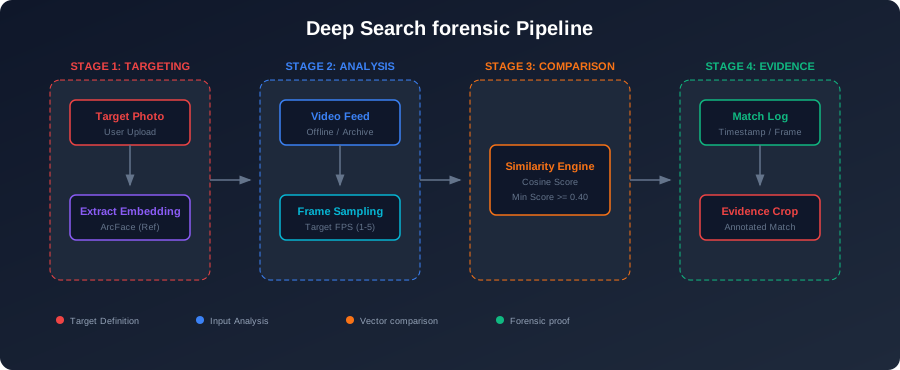
The deep search process utilizes a comparison-based neural architecture designed for high-throughput forensic analysis.
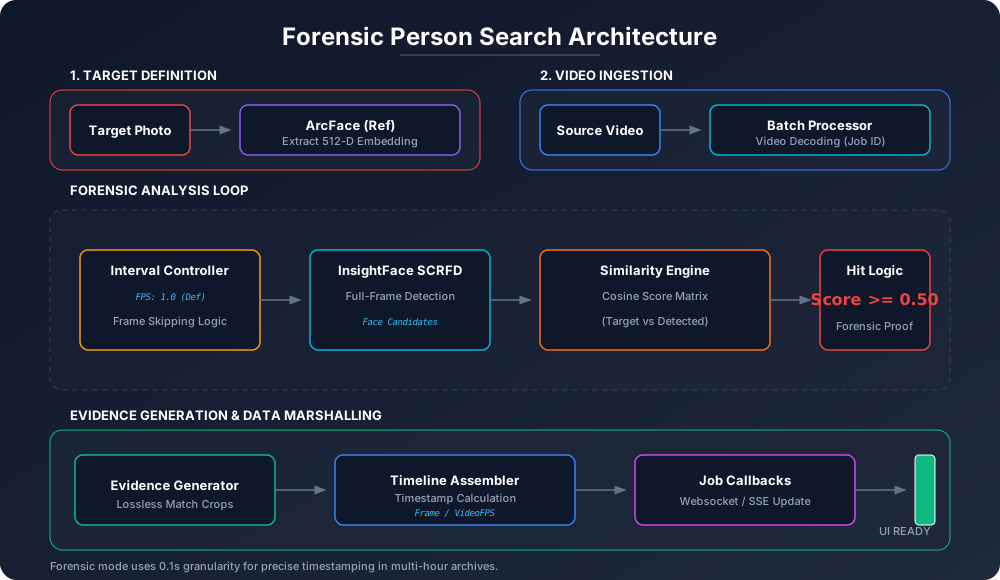
Detailed Architectural Design
The following architectural diagram illustrates the internal processing loop, target embedding ingestion, and the evidence generation pipeline.
Steps
1. Upload Target Photo
Upload a clear, front-facing photo of the person you want to find. The system works best with high-resolution images where the face is clearly visible.
2. Configure Search Parameters
- Similarity Threshold: Adjust the sensitivity of the match. A higher threshold (e.g., 0.65) reduces false positives but may miss shots; a lower threshold (e.g., 0.45) is more inclusive.
- Search Nodes: Select which cameras or recorded files should be included in the search.
3. Execution & Monitoring
Once started, the system extracts the face embedding and begins scanning incoming frames.
- Real-time Alerts: If a "High Similarity Match" is found, the system triggers a critical alert.
- Track Logs: You can view the history of detections with timestamps and location data.
Best Practices
- Use a photo with neutral lighting.
- Ensure only one person is visible in the target photo.
- For best results, use a photo with a minimum resolution of 300x300 pixels.
Optimization Strategies
1. Sampling Intensity (FPS)
To handle large archives, users can adjust the Sampling FPS. This determines how many frames per second the AI analyzes.
- Low Intensity (1-2 FPS): Efficient for long durations (e.g., 24-hour logs).
- High Intensity (30 FPS): Maximum precision to ensure no appearance is missed (Forensic Mode).
2. Forensic Thresholds
The system uses a similarity score (0.0 to 1.0) to determine a match.
- Default Threshold:
0.4 - 0.5. - Behavior: A lower threshold increases recall (finding more possible matches) but may increase false positives. A higher threshold ensures only certain matches are flagged.
Batch vs. Live Search
| Feature | Live Search | Batch Search (Archive) |
|---|---|---|
| Feedback | Real-time SSE streaming | Background job processing |
| Output | Base64 Screenshot feed | Persistence .MP4 with overlays |
| Use Case | Quick visual scan | Long-term indexing/reports |
| Parallelism | Single Stream | Multi-threaded extraction |
Match Result Logic
When a match is confirmed:
- Spatial Localization: The system extracts the specific bounding box of the matching face.
- Screenshot Generation: A JPEG screenshot is encoded at 60% quality to provide visual evidence without excessive bandwidth.
- Timeline Integration: Matches are timestamped relative to the video start time, allowing operators to jump directly to the relevant segment in the source footage.
Technical Specifications
- Feature Extractors: InsightFace ArcFace (r100 architecture).
- Comparison Engine: Cosine Similarity using Optimized NumPy/ONNX Runtime.
- IO Handling: Multi-part form-data for video + image ingestion.