.png)
Video Processing
Batch processing CCTV recordings, video files, and RTSP streams for face recognition
The video processor enables batch processing of CCTV recordings, video files, and RTSP streams for face detection, recognition, and attendance tracking with YOLOv8 person tracking.
Features
- Process single video or folder of videos
- YOLOv8 person detection with ByteTrack tracking
- Persistent track IDs across frames
- Frame skipping for performance optimization
- Save annotated output video with bounding boxes
- CSV logging with frame, timestamp, track ID, name, confidence
- Session summary with unique tracks and identified persons
- Zero-lag RTSP engine for IP cameras
Supported Formats
- MP4
- AVI
- MKV
- MOV
- WMV
- RTSP streams (IP cameras)
Technical Workflow Diagram
The following diagram illustrates the multi-stage pipeline used for batch video processing and RTSP streaming:
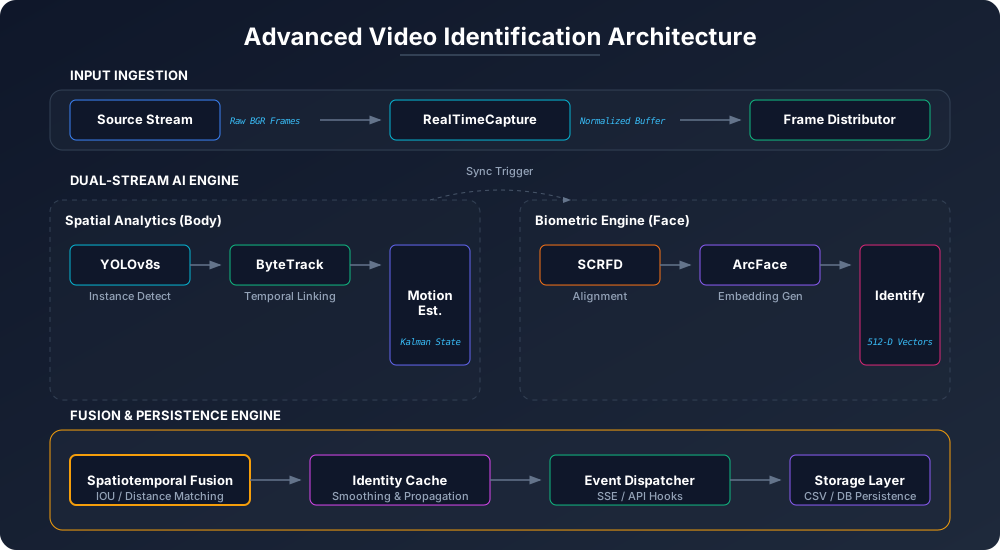
Processing Pipeline
For each frame, the video processor runs:
| Step | Component | Description |
|---|---|---|
| 1 | YOLOv8 | Detect all people in frame |
| 2 | ByteTrack | Assign/maintain track IDs |
| 3 | InsightFace SCRFD | Detect faces in full frame |
| 4 | InsightFace ArcFace | Extract embeddings, match identity |
| 5 | IoU Matching | Link faces to tracked persons |
| 6 | Identity Cache | Preserve last known identity |
| 7 | Logging | Write to CSV and annotate frame |
Processing Options
Frame Skipping
Skip frames for faster processing.
| Skip Value | Use Case |
|---|---|
| 1 | Maximum accuracy (default) |
| 5 | Balanced |
| 10 | Fast processing |
| 30 | Quick scan |
Tracking Modes
| Mode | Description |
|---|---|
all | Track and display all detected persons (default) |
known_only | Only show persons with recognized faces |
RTSP Zero-Lag Engine
For IP camera streams, the system uses a multi-threaded zero-lag engine:
Features:
- Multi-threaded reading - Frames decoded on background thread
- Always latest frame - No buffering, always processes most recent frame
- Auto-reconnect - Detects connection drops, retries every 5 seconds
- 24/7 monitoring - Designed for continuous operation
How it works:
- Daemon thread continuously reads frames from RTSP stream
- Main thread always gets the latest frame (not buffered)
- Prevents lag accumulation common with standard video capture
- Handles network instability without crashing
Output Files
Annotated Video
When saving video output, creates video with:
- Person bounding boxes (from YOLOv8)
- Track IDs (e.g., "#1", "#2")
- Person names and confidence scores
- Timestamp overlay
- Progress percentage
CSV Log
Automatically generated log containing:
| Column | Description |
|---|---|
| Frame | Frame number |
| Timestamp | Time in video (HH:MM:SS) |
| Track_ID | Persistent person tracking ID |
| Name | Recognized person name or "Unknown" |
| Confidence | Recognition confidence (0-1) |
| X1, Y1, X2, Y2 | Person bounding box coordinates |
| Detection_Score | YOLOv8 detection confidence |
Example CSV:
Frame,Timestamp,Track_ID,Name,Confidence,X1,Y1,X2,Y2,Detection_Score
1,00:00:00,1,John,0.8923,100,50,200,150,0.95
2,00:00:00,1,John,0.8920,102,52,202,152,0.94
3,00:00:01,2,Unknown,0.0000,300,60,400,160,0.91
Session Summary
After processing completes, displays:
============================================================
PROCESSING COMPLETE
============================================================
Frames: 1500/1500
Unique Tracks: 12
Identified Persons: 8
Names: Bob, Jane, John, Mike, Sarah
Preview Controls
During processing (when preview is enabled):
| Key | Action |
|---|---|
ESC / Q | Stop processing and show summary |
Identity Caching
The system maintains an identity cache per track ID:
- Purpose: Preserve identity when face temporarily not visible
- Behavior: Only updates on confirmed (non-Unknown) matches
- Benefit: Stable identity even when person turns away briefly
Configuration
| Setting | Description | Default |
|---|---|---|
| Frame Skip | Process every Nth frame | 1 |
| Output Directory | Annotated video location | output/ |
| YOLO Model | Person detection model | yolov8n.pt |
| YOLO Tracker | Tracking algorithm | bytetrack.yaml |
| YOLO Confidence | Person detection threshold | 0.8 |
| Track Mode | all or known_only | all |
| Show Track ID | Display track IDs | Enabled |
Performance Tips
Processing Speed
| Factor | Impact |
|---|---|
| Frame skip value | Higher = faster |
| Video resolution | Lower = faster |
| GPU enabled | Significant speedup |
| Preview disabled | Slight speedup |
| YOLO model | yolov8n (fastest) vs yolov8m (slower) |
Estimated Processing Time
For a 1-hour video at 30 FPS (108,000 frames):
| Skip | Frames | Approx. Time (CPU) |
|---|---|---|
| 1 | 108,000 | ~60 minutes |
| 5 | 21,600 | ~12 minutes |
| 10 | 10,800 | ~6 minutes |
| 30 | 3,600 | ~2 minutes |
Actual times vary by hardware and video content.
Use Cases
CCTV Recording Analysis
Process daily CCTV recordings with all output options enabled.
Real-time IP Camera Monitoring
Use RTSP mode with zero-lag engine for live monitoring:
- Auto-reconnect handles network issues
- Always processes latest frame
- Session summary on exit
Quick Person Search
Find if a specific person appears in video by using high frame skip value and checking the CSV log.
Building Attendance from Video
- Process video to identify all persons
- Check CSV for track IDs and first-seen times
- Import CSV to attendance system
Troubleshooting
Video won't open
- Check file path is correct
- Verify video file isn't corrupted
- Install video codecs if needed
RTSP stream disconnects
- System auto-reconnects every 5 seconds
- Check network stability
- Verify RTSP URL is correct
Out of memory
- Increase frame skip value
- Process shorter video segments
- Enable GPU to offload processing
Slow processing
- Use headless mode (no preview)
- Increase frame skip value
- Enable GPU if available
- Process on faster storage (SSD)
- Use yolov8n.pt instead of larger models
Track IDs changing unexpectedly
- Adjust YOLO confidence threshold
- Use botsort.yaml tracker for different motion model
- Ensure good lighting conditions